
Mills IT as your Office 365 Partner of Record
If you find our services useful I hope you’ll consider setting Millsit as your Partner. By designating Millsit as your Office 365 Partner, we receive small financial support from Microsoft that enables my continued development on content and tools. Designating Millsit as your Partner does not cost you anything, does not give us access to your data, and has no impact on the support you already receive from Microsoft.
1. Log into https://portal.office.com, and in the left column, click Billing and then Subscriptions.

2. Click on One of the subscriptions from the centre column. your subscription and in the Subscription Details page that appears click add under partner information.

3. Click More Actions and Add partner of record
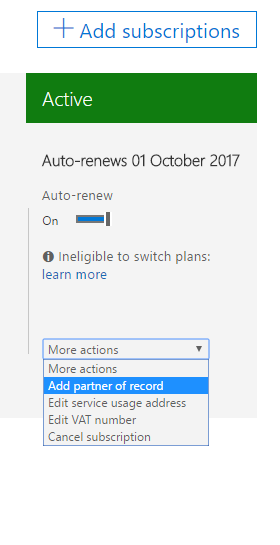
4. In the Microsoft Partner ID field input 4561974 and click Check ID. Millsit or Independent Computer Professionals should be displayed. (like below)

5. Click OK
6. Repeat steps 2 – 4 for each Office 365 Subscription you have.
Microsoft Offical Customer Guidance Notes
You can use these step-by-step guides to help your customers associate you as a partner providing services for their Microsoft cloud subscriptions:
Attaching a Digital Partner of Record for Microsoft Office 365, CRM Online, Intune, and EMS
Attaching a Digital Partner of Record for Azure
Download the Customer Guide to attaching a Digital Partner of Record for Azure